


PRODUCTS > Guru
New in GURU 1.6
GURU version 1.6 is a free upgrade to all GURU version 1.x registered users and incorporates key new features and fixes.
  • Note repeat , note erase and fixed-level triggering for the pads
  • Looping and phase flip per layer
  • Patterns can now be up to 16 pages (512 steps) long (increased from 4 pages)
  • 16 stereo outputs (increased from 8)
  • Instant graph record from MIDI CC
  • Skinning support
  • various workflow and midi implementation enhancements (improvements to midi remote control, layer context menus etc.)
Download GURU v1.6 now from your FXpansion Account.
New in GURU 1.5
GURU version 1.5 is a major upgrade, incorporating close to 100 new features and enhancements. Best of all, it’s free of charge to all registered owners of GURU! Download GURU v1.5 now from your FXpansion Account.

New Audio Content
3 Gigabytes of new audio content covering hip hop, grime, rock, house, trance, experimental, breaks and more, from producers such as Goldbaby, Groove Criminals, Deadmau5, Bearded Lazies, Drummerheads and DJ Subject.

Compatibility
100% compatible with the latest hardware & software platforms including Dual, Quad and 8-Core systems, Intel-based Macs, Windows Vista, Pro Tools 7.x, Digital Performer 5.x (including DAE mode).


Audio Export
You can now render pads, tracks, engines or the full mix directly within GURU, and instantly export it via drag + drop to your host or OS, or give the rendered loop a second pass through GURU for further mangling. The audio exporter automatically tops and tails loops during rendering so they’re ready to use straightaway in Live, Acid or other loop environment.

Randomizer
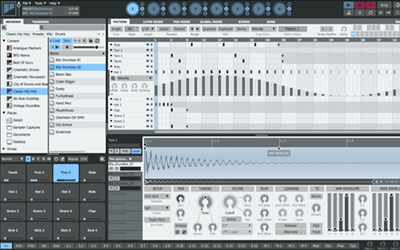
A new creative inspiration factory, the randomize slider can operate on any of GURU’s main screens – sequence, graphs, pad edit, effects, mixer – and allows you to apply a controllable amount of randomization to either the current pad or various combinations. Click on the randomize slider to generate a new set of ‘seed’ values, then drag to the left or right to apply them progressively to your patch. Hold down ALT or SHIFT while dragging the randomize slider to apply the process over a wider area – if you don’t like what you hear, just hit the Undo button to the right.


Sample editing – reverse, new layer modes, predelay
Samples can now be played backwards, and layers can be stacked in Random and Round Robin modes as well as the more conventional All Layers and Velocity Split. We’ve also added a Pre Delay per layer (in both milliseconds and musical units) allowing you to shift individual parts by a few ticks to get your groove ‘in the pocket’, or to create single-pad flams and ruffs out of individual samples.

Slicer
We’ve given GURU’s slicer a major overhaul – it is now much more accurate, and has a ‘Sensitivity’ control allowing you to adjust how it responds to possible hit points in your loops. In addition, its slicing and score extraction process is now velocity-aware - slices and scores are now generated in such a way that hit volumes are consistent when using the sounds from one loop with the score from another, or the score from a loop with a kit, or the slices from a loop with a pattern.

The Slicer can now be toggled between SINGLE mode, in which one slice is loaded per pad, and FULL mode, where up to 8 slices are loaded per pad, using the Layers. This allows Guru to fit long loops (up to 128 slices) in a single engine; it also supports a Linear Scoring mode where instead of smart-slicing by drum type, the slices are simply mapped to pads 1..16 in the order they occur in the loop file, much like a conventional slicer.

Browser
The Browser is now significantly faster and can be driven entirely from the keyboard. We’ve made loads of little workflow enhancements like the PlusFX and PlusMIX controls, so you can now selectively preserve or overload your pad tweaks and mixer effects when loading loops or kits. Double clicking a browser tab now opens that tab as a folder in Finder/Explorer, and dragging an OS folder to the browser sets the current tab to that location.

In the Pads browser, we’ve also added a volume control for auto-preview, and support for multiple selection so you can drag multiple samples to the pads or layers in one go.

Keyboard Support
GURU can now be driven largely without resorting to the mouse – the pads, patterns, browser, engines and transport all respond to the keyboard. Additionally, you can now mute, solo and un-mute individual engines at the touch of a button.

Sequencer – improved sync, note duration / gate
The sequencer now locks to the host tighter than ever, and responds instantaneously to pattern change / gate messages allowing you to recombine and retrigger patterns at warp speed – perfect for drum and bass. GURU now supports note-duration across-the-board, allowing you to cut samples off before the full length plays.

There are new sequencer graphs for automating the Sample Reverse feature, and better support across-the-board for triplets, polyrhythms, and non-4/4 meters. Each pattern can be set to a different resolution - 8th, 16th, 32nd or 64th notes, as well as triplets.

MIDI implementation
GURU’s MIDI implementation has been greatly extended. As well as supporting realtime MIDI out (VST hosts only), GURU can now sync to MMC and MTC, and additional MIDI channels and controller messages have been added to give you full remote control over engine, pad and pattern selection, transport controls, and engine mute/unmute, as well as the effects section and the entire mixer.

Miscellaneous
The audio engine is now drop-out-free, no more gaps or silences when previewing; we’ve added value readout tool tips across-the-board and improved the sample file management system a great deal. You can now hide the default “Kick”, “Snare” etc. name assignments for the Pads; the name of the currently loaded song and kit or loop are displayed in the transport window. Finally, we’ve added a context menu to the Engine selectors allowing you to copy, paste, clear etc. entire Engines with just a couple of clicks – great for creating variations on a kit, for instance.

FULL LIST OF NEW FEATURES:
(click to expand)

EXPORT

BROWSING

SLICING

MIDI IMPLEMENTATION

WORKFLOW

SEQUENCER, PATTERNS, SEQUENCE EDITOR

PAD EDITING

MISCELLANEOUS
GURU 1.5 AUDIO DEMOS

 Download MP3s


WHAT PEOPLE ARE SAYING
"I love bringing in GURU as an instrument in my sequencer. It's so easy to use and it has limitless capabilities. It's very quick to get great patterns going and you can get really in depth with the programming as well."

- Ken Jordan - The Crystal Method

"I have FXpansion GURU and it is the best thing to ever happen to me! Finally, no more FL Studio." -6am

"You guys really did it with this update, the randomizer is so sick, the qwerty is dope as hell too. This is the undisputed drummachine champion of the world." -triple p

"This thing is a beast! It does everything... Expensive but worth every penny if your into beat creation... I love the groove function... load in a break then chop it and turn into groove template... Bam! Jaming using the scenes is insanely fun too!" -huggie

"GURU is the best plugin in my collection right now." -skycutter76

"I like phatmatik, but GURU blows it away. watch the guru videos at fxpansion.com -- they are a bit long winded, but half way through you'll see just how powerful Guru is." -nonplus

"Better than anything else on the market."-bread

"My new favourite VST - I love this thing to death. GOD DAMN!"-jiggsaw

"I can honestly say that GURU has become a central part of my music-making process. In fact, it has replaced KONTAKT, BATTERY, many of my soft synths, REASON, my beloved AKAI MPC, and improved my workflow tremendously. Furthermore, it barely eats up any CPU!!!"-kay

"A great way to make beats. I've used it on countless remixes and some originals. the possibilities within the program are incredible."- Claude VonStroke

“Guru’s vast sample library alone makes it an amazing addition to my studio.” - Christian Martin (dirtybird)
HOMEPRODUCTSSUPPORTSHOPCOMMUNITYCOMPANY
© 1998-2010 FXpansion™ Audio UK Ltd. All rights reserved.